
Access Control for Post Production Workflows
Access control is a primary feature of any shared storage system. The downside of products that use network Access Control Lists (ACLs) is the inability to secure data during the production workflow. With Smart Access Rules, Facilis delivers access control on the active file systems while in production. Modifying and saving project files in multiple applications, working with camera raw and proxies, and sharing media and project directories can succeed even when the files are secured from deletion.
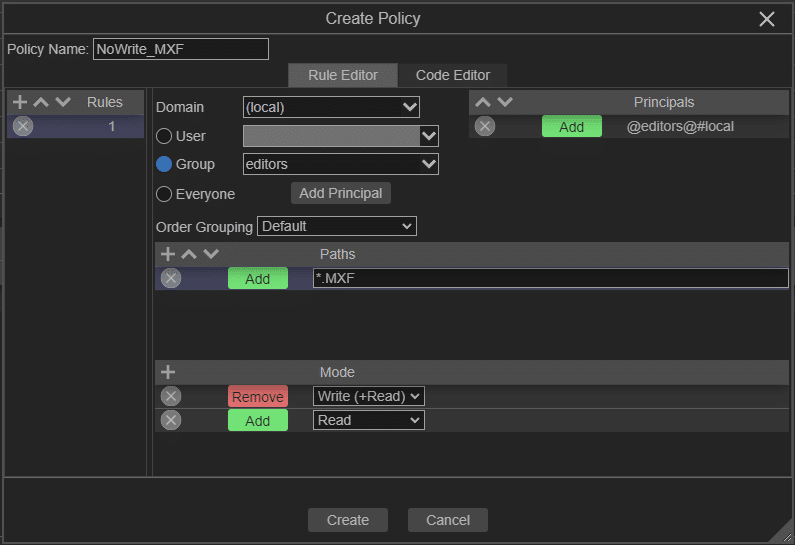
Smart Access Rules is a policy engine that utilizes the Facilis Shared File System software to secure paths and files against unwanted activity. The policies are templates that can be applied to any volume, whether or not the folders or files even exist yet. It’s based on normal user accounts, or can be linked to Active directory user accounts, so certain groups or users can be allowed access while others are restricted. Smart Access Rules does all this within the familiar Facilis Console, so there’s no need to learn another interface.
Normal policies can restrict writes or changes to folders or files in a certain location, but Smart Access Rules goes well beyond that. These are just a few of the unique features that are difficult or impossible to enable on NAS systems with standard network ACLs.
Unique Features of Facilis Smart Access Rules

Restrict Delete
by File Type
Projects, bins, camera raw; protect only these file types from unintentional or malicious deletion, regardless of where they exist on your storage. Continue to modify and save them within the creative applications. When delete is restricted, the user can’t mistakenly move or rename the files either, so they’ll always be where you expect them to be.
Full On-access
Auditing
When the stakeholders want to know who copied those files to a hard drive last Friday, will you be able to tell them? When a shot is deleted and will take three days to get back from archive, would you want to solve that mystery? Turn on auditing of certain locations, file types, or just everything, and let it run. There’s no such thing as too much information!
No-Write Files in
Read/Write Folders
Normal ACLs will tell you that it’s impossible to have write access to a location, but not on a file in that location. Smart Access Rules does this easily with extension matching rules that secure files from change, while leaving the directory open to new file creation. Think about how important that will be after the next big ransomware attack leaves your data unscathed.

Undelete/Recycle
of Selective Files
Recycle bins recycle everything, into a flat container where it’s very difficult to see what’s important. Facilis Undelete allows the administrator to specify certain file types, locations and users will benefit from a recycle bin and which won’t. This keeps things moving along but protects the most critical files from the most accident-prone users.
Smart Access Rules Video Tutorials
If a customer ever needs help configuring their Smart Access Rules policies, they can just contact our expert support department. Here’s some simple videos to get started, so you can see how easy it is to increase your data security.